Skip to content

If you want to race at Disney, you need to be ready the moment registration opens. The RunDisney race is one of the most popular running events in the United States. Many races sell out within hours, and some distances can sell out even faster. In this guide, you will learn exactly How to register for a runDisney race, when registration opens, and how to increase your chances of getting a spot before the race sells out.
I have run several runDisney races, including the Dopey Challenge and the Dumbo Double Dare Challenge. A Disney race weekend is one of the most fun events you can do, but it requires advance planning. This step-by-step guide will help you understand the runDisney registration process and be ready when registration day arrives.

runDisney typically opens registration Months before each race weekend. Registration typically opens around 10am ET / 7am PT on the scheduled day.
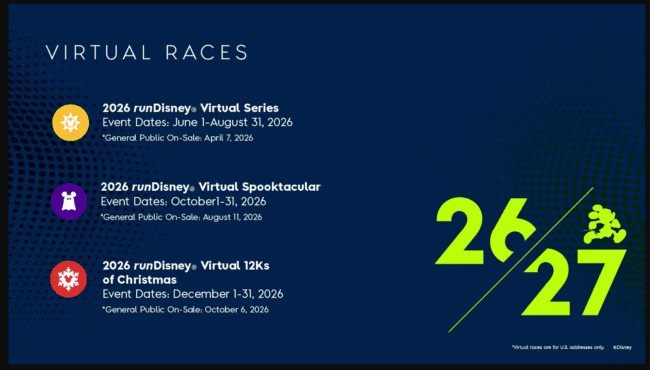
The complete race and registration schedule can be found in this guide. run 2026/2027 Disney Race Calendar and Registration Dates
Registration dates will be announced in advance, so it’s important to mark them on your calendar.
The registration process looks like this:
Step 1: Create a runDisney account
Please create an account on the runDisney website before registration begins. Preparing your account in advance will save you valuable time at checkout. This can be done a few days before your registration date, so you can simply log in when the time comes.
Step 2: Log in before registration begins
Log in to your runDisney account At least 15-30 minutes before registration begins. Many runners open the registration page early so they can be ready when the system goes live.
Step 3: Join the virtual queue
Once registration opens, runners can Virtual waiting room queue. This queue determines when you can access the registration page.
Important things to know:
- The queue will open automatically once registration begins
- Your column order is random
- Refreshing the page won’t move you forward (don’t refresh the page or you’ll lose your place in the queue)
Once you arrive at the front of the line, you can register.
Step 4: Choose your race
Select your desired race distance. Decide on your “A” and “B” options in advance in case your first choice sells out before your turn to register.
Depending on the race weekend, options may include:
- 5K
- 10K
- half marathon
- marathon
- Challenge races such as Dopey Challenge and Fairy Tale Challenge
Once you have made your selection, proceed to checkout.
Step 5: Complete your registration now
Races can sell out quickly, so it’s important to complete checkout quickly. Please have this information ready before it is your turn to register.
You need to make sure that:
- personal information
- emergency contact
- Estimated finish time (proof of time can be added later if needed)
After checking out, you will receive a confirmation email.

runDisney races often sell out quickly.
A typical sell-out timeline is as follows:
- Most Popular Disney Marathon Weekend Races Sold Out in Less than 2 Hours
- Princess Half Marathon races sell out within hours
- Wine and Dine races often sell out within hours
- Popular challenge races can sell out within an hour
Due to such demand, we recommend that you prepare to register The moment registration begins.
These tips can increase your chances of getting a race bib.
Please log in early
Please log into your runDisney account before registration begins. This avoids delays once registration begins.
Know the backup competition
Certain races may sell out first. Decide in advance if you are willing to run another distance if your first choice of course sells out.
Register for one race at a time
If you would like to participate in more than one race, please register separately. The sooner you complete checkout, the better your chances of securing a spot.
Use multiple devices
Successfully registered for multiple Disney races without using multiple devicesSo I don’t think this tip is really necessary. But I also know that this is one of the top tips I hear when people talk about signing up for Run Disney. No need for multiple devices. You just need to log on and register on time, don’t refresh the page and wait patiently. It’s your turn to register, but when that time comes, the question is which races are still open. Therefore, although this is not required, many runners open the following registration page:
- computer
- phone
- tablet
By queuing each device individually, it is more likely to be processed faster.

Even if the race is sold out, there are several ways to participate.
charity bibs
Many nonprofit organizations accept race bibs and offer them in exchange for fundraising efforts.
travel package
Some official Disney travel providers offer race packages that include race registration.
virtual race
The runDisney Virtual Race lets you earn Disney-themed medals while completing distances from anywhere.